My Intro
I have been wanting to take this class since I started this program way back in 2022. I’ve also been scared of it, because other than CS1 which was in C++ which I took exactly 10 years ago I’ve only ever written code in Python (okay a little C# in VGAI but that doesn’t count). So to prep for this I’ve been following beej’s guide to c which has been a nice prep for at least thinking about having to care about memory.
Reading through it, doing a bit of code workshops, getting used to compiling (gasp) things, etc has been a good time, though I won’t write too much about that. That being said, I haven’t finished the whole guide, I’m about halfway through, so this is definitely going to be a learning experience for me.
I see the multitude of footguns with which C provides me, and I’ve definitely got a couple holes in my feet just from my little toy scripts to start getting things to run. So wish me luck everyone. I’ll mostly just do lecture notes in here, because I believe it’s prohibited to talk about the projects anywhere that’s not official OMSCS channels.
Part 1 - Introduction to Operating Systems
An operating system is a piece of software that abstracts and arbitrates the underlying hardware of a computer system.
All OSes provide many abstractions and arbitration methods to interact with the underlying hardware.
Visual Metaphor
“An operating system is like a toy shop manager”
It is like this because:
- Directs resources like employees/parts/tools
- Enforces how employees work in policies like safety/fairness
- Navigate complex tasks (this feels like a stretch) by simplifying operations and optimizing performances for all the underlying resources
The operating system:
- Directs operational resources like PCU, memory, peripheral devices
- Enforces working policies like fair resource access and limits to resource usage
- Mitigates difficulty of complex tasks by abstracting hardware details (system calls)
What is an operating system?
It is software that handles interactions with hardware like CPU, GPU, Memory, USB, Networks, and Disks. On the other side of the operating system you have applications that would like to take advantage of that hardware.
So the operating system acts as a common interface between lower level hardware, and higher level applications. It hides hardware complexity. It manages resources, ensuring memory isn’t over-used, disk space is not too low, and bus channels are not flooded.
Additionally it provides isolation and protection so that applications can not cause trouble with each other by doing something silly like one app modifying memory that another app might be using.
Official Definition
An operating system is a layer of systems software that:
- Directly has privileged access to the hardware
- Hides hardware complexity
- Manages hardware on behalf of one or more applications
- Ensures applications are isolated and protected from one another
Operating Systems Examples
Desktop OSes
- Microsoft Windows
- Unix based
- Ubuntu, ARCH, MACOS, CentOS, etc
Embedded OSes
- Android
- iOS
- Symbian
Each operating system makes some unique choices in their design and implementation. This class cares about Linux, Ubuntu specifically.
OS Elements
Abstractions
Directly relate to hardware usually, provides abstracted way to read hardware.
- process
- thread
- file
- socket
- memory
Mechanisms
Mechanisms are tools that the OS uses to handle those abstractions
- create
- schedule
- open
- write
- allocate
Policies
Methods in which the OS uses its mechanisms and abstractions.
- Least recentuly used
- Early deadline first, etc
So policies employ mechanisms which are built on abstractions. An example is memory management which employs least recently used policy, and in doing so allocates, writes, etc using the memory abstraction.
OS Design Principles
Separation of Mechanism & Policies
- Implement flexible mechanisms to support many policies
Optimize for commons case
- Where will OS be used
- What will the user want to be able to execute
- What are the workload requirements
User/Kernel Protection Boundary
The OS must have special privileges to have direct access to the hardware.
Generally this is broken into user-level privileges and kernel-level privileges. Operating systems need kernel-level privileges, where applications generally have user-level privileges (except for some anticheat things in games like valorant or Battlefield 6).
Traversing from app to hardware is via the OS, and the OS can perform checks to make sure illegal things aren’t happening, and provides the system calls to provide tools for the apps to use. Things like:
- open file
- send (Socket)
- allocate memory
Typical System Call process
- User process starts execution
- User process calls system call (non-kernel level)
- System call is executed (kernel leve) and returns result
- Process result of system call, continue processing
To make a system call you must:
- Write arguments
- Savel relevant data in well defined location
- make system call, providing necessary info
Crossing User/Kernel boundary
Crossing the boundary is a requirement, for apps to actually take advantage of the hardware it is running on.
The OS is responsbile for making sure the apps can’t do anything catastrophic to the machine. This includes things like illegal instructions, memory access, and maintaining appropriate privileges. It is also responsible for dealing with traps on illegal instructions, and deciding what and how to handle them.
Doing the user-kernel transition does take some time, anywhere from 50-100 ms on a 2ghz machine.
It also switches the locality, from a fast in-memory cache, to a potentially slower cold memory storage.
It costs a lot to cross the boundary!
OS Services
The OS provides tools for apps via things called services.
The scheduler helps schedule work to be done by the cpu.
The memory manager makes sure that memory is appropriately assigned.
Block device drive helps to interact with devices attached to the system.
The file system is a service that allows apps to maintain persistent files on hard disks.
These services are all available via system calls, in different flavors based on the OS you’re using.
Operating System Organizations
Monolithic OS
All potential services are built into the OS directly. Could have mem management, many different filesystems for different purposes, etc.
Pros:
- Batteries are all included
- Allows for inlining, compile time optimizations, etc
Cons:
- Customization is low
- Portability is low
- Requires more memory
- etc
It’s not great.
Modular OS
This OS has the basic services as a part of it from the core but then many modules and interfaces can be added as needed.
The OS makes this possible by specifying interfaces that are required to interact with the hardware. So given that documentation, we can make a module for ourself that is optimized for a specific task.
Pros:
- Easier to maintain
- Smaller footprint
- Less resource intensive
Cons:
- indirection can impact performance (have to go through the interface a lot)
- Maintenance can still be an issue (even though it’s a pro lol)
Generally modular is preferred and is much more commonly used.
Microkernel OS
Only requires the most basic primitives at OS level. Address spaces, threads, etc could be included but things like file systems, disk drivers, and db stuff runs outside of kernel level but at user level.
You can imagine this requires lots of inter-process communications, as well as lots of user-kernel barrier traversing. Inter Process Communication is therefore included in microkernel OSes.
Pros:
- Size is very small
- Verifiability
Cons:
- Portability is bad because it’s so custom
- Very complex software development
- Cost of crossing user/kernel boundary
Linux Architecture
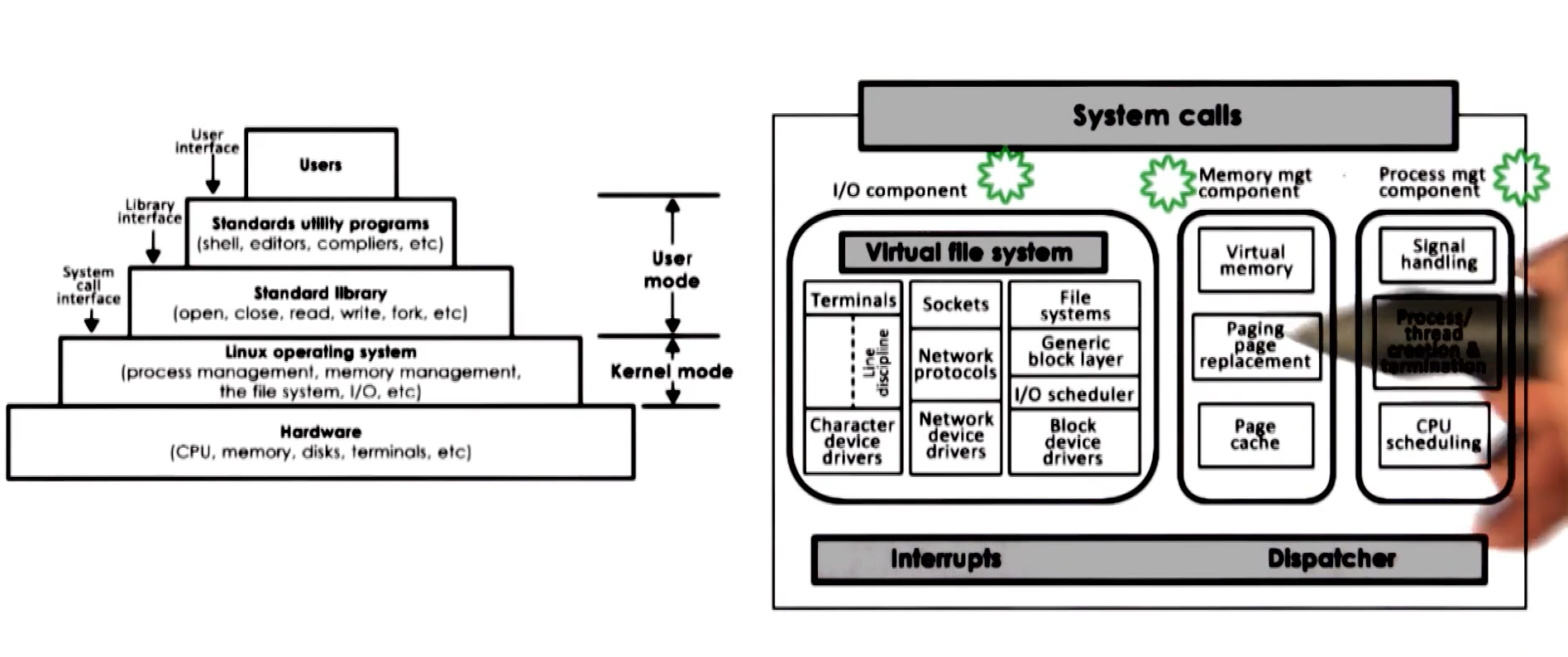
Linux uses a modular approach with a specific organization.
Mac OS Architecutre
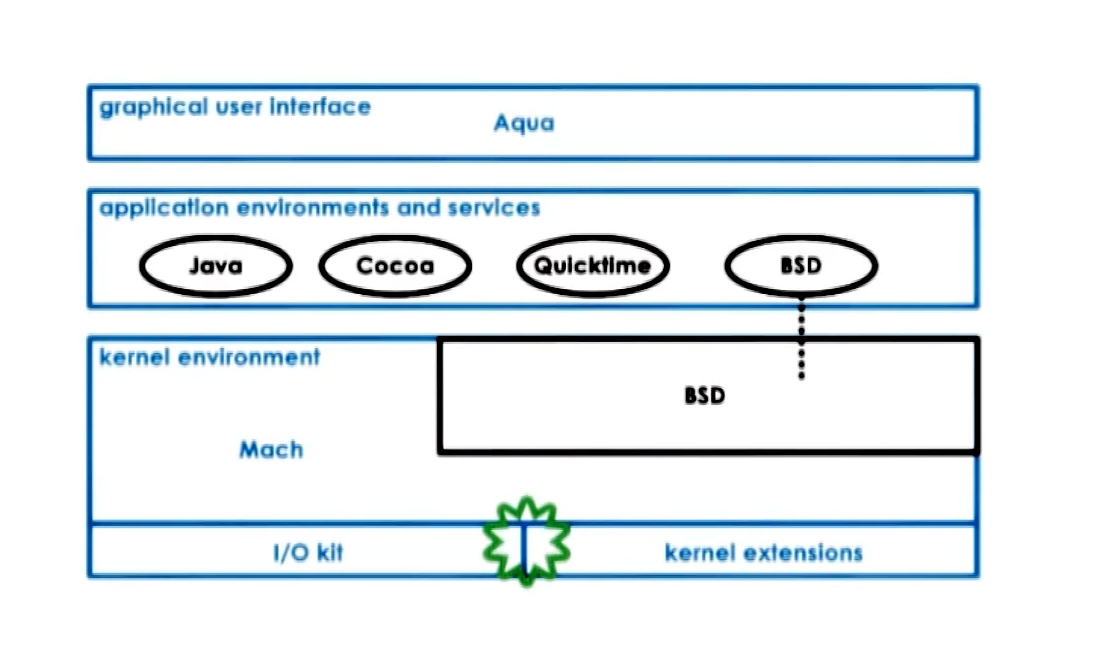
Uses a core microkernel which gives primitive systems, but then has BSD that interacts with rest of apps
Part 2 - Processes and Process Management
A process is an instance of an executing program.
Process may require:
- State of execution (program counter, stack)
- Parts and temporary holding area (data, register, state in memory)
- Special Hardware (I/o devices)
Process == State of a program when executing loaded in memory (active entity). This is different than an application on disk or in flash memory which is a static entity.
An example of this is opening two notepad applications at the same time. You have two execution states of the same application, running independently.
The process includes many addresses and different pieces of the process state live at those addresses. Things like:
- Stack (grows and shrinks in LIFO queue)
- Heap (dynamically created like malloc)
- data (application state on first load)
- text (usually the code)
Process is made up of v0 through Vmax, which is all the possible memory a process could use. This is virtual memory, because the addresses don’t necessarily need to be beside eachother and instead rely on page tables which map virtual addresses to physical addresses in the actual RAM.
This can even extend to physical memory locations like some being in RAM and some being on disk. The OS at all time is maintaining the address spaces that this process should be able to use.
How does the OS track processes
The operating system must have some knowledge of what the application is going to do, that way it knows how to handle things ending. This program counter is how the OS tracks which area of the process we are in and what it’s doing. Additionally CPU registers and stack pointers which provide the OS many ways of understanding where and what a process is doing.
All of this information is maintained in a “Process Control Block” or PCB.
Process Control Block
PCB is a datastructure containing all info the OS needs to track what is going on within a process.
- Process state
- Process number
- Program counter
- registers
- memory limits
- list of open files
- priority
- signal mask
- cpu scheduling info
- And more, but they change a lot
Context Switching
Given two processes sharing a CPU, they handle which one currently gets the CPU by a mechanism of “Context Switching”.
It switches the CPU and its registers from one process to another. This is a context switch and does come with some overhead. There are direct costs which is the number of cycles executed to load and store instructions, and indirect costs which is getting all of its old data out of the cold caches, resulting in more time.
Short story, contexxt switching is expensive and slow, so we are incentivized to minimize how much switching is required.
Process Lifecycle
Processes can be either running or idle. Whether it is running or idle is based on the OS Scheduler. But the lifecycle is a tad more complicated:
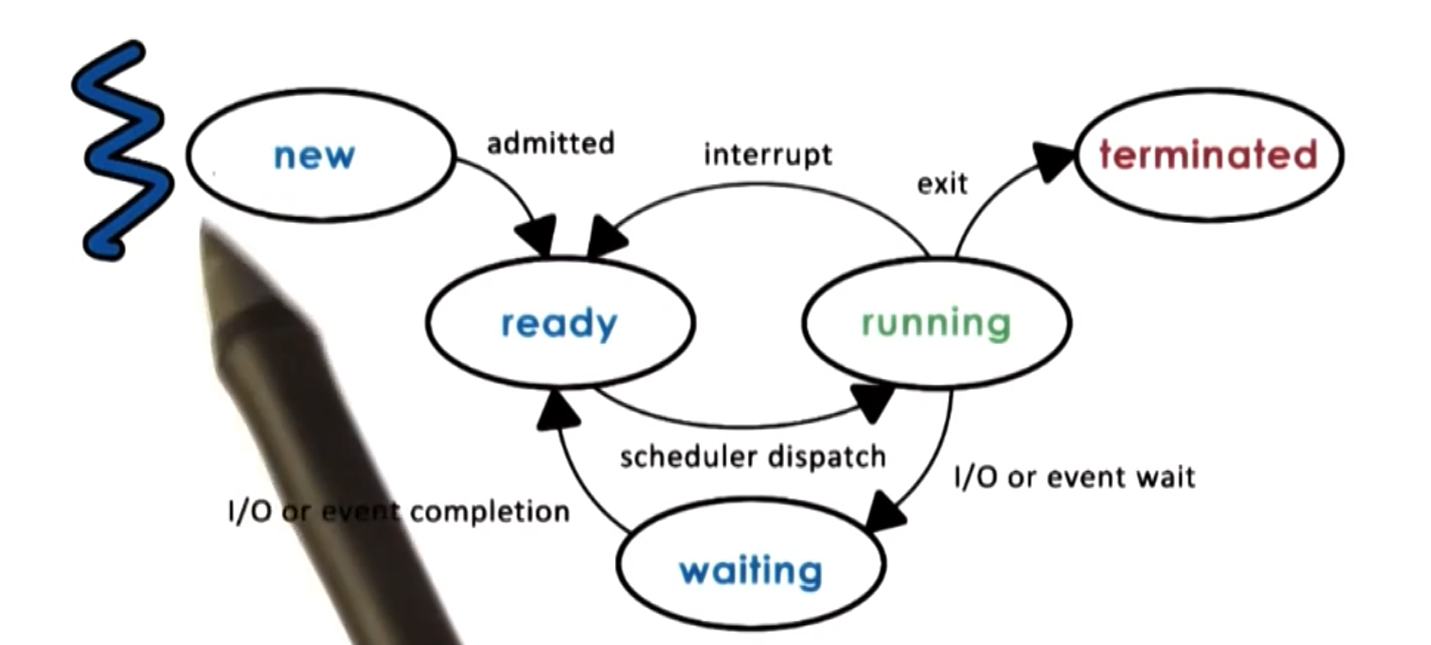
At the heart of it all is the OS scheduler which determines when processes get to use the CPU.
Process Creation
Generally process creation comes in the form of a tree. There is a root node, which has super permissions and then from there creates all its necessary OS processes. Something like a user process would be spawned with lower permissions than root, and then anything the user spawns from there will have the user level permissions, assuming standard usage.
Processes can generally be created via two mechanisms:
- fork: Copies the parent PCB into the new child PCB, so a full copy of the existing process, parent and child continue their execution nearly identically afterwards
- exec: Replaces child image and then loads a new program and starts from the first instruction
CPU Scheduler
How does the CPU Scheduler work? Given a queue of “Ready” processes, which one gets scheduled onto the CPU? First in first out? Priority? Etc.
The scheduler is responsible for figuring this out. Of the currently ready processes it has a method of determining which processes should be dispatched to a CPU, and how long/ how many cycles does it get on the CPU.
To do this the OS must:
- Preempt: interrupt and save current context
- Schedule: Run scheduler and decide next up process
- Dispatch: Send process to the CPU and switch into its context
Part of this equation is “How long should the process run for?”. Longer run times is less scheduling, but then might delay how long it takes for some small processes to get completed if the queue is very busy.
If your processes take very similar time to complete to the time scheduler takes, you want to schedule as little as possible. Timeslice is the name of how much CPU time a process is given. Ideally your timeslices are much larger than your scheduling time, meaning you spend most CPU cycles actually doing things and not just in scheduling overhead.
I/O Considerations
I/O impacts scheduling, and CPU usage. For example, given an I/O request to the disk, once the CPU has made that request, it is then just waiting for the I/O queue to fulfill that request. Once that I/O request is done, it puts the process back into the ready queue and waits till its next turn.
Inter-Process Communication
Simple is to have a single process which keeps everything internal to it. This is nice, but doesn’t take advantage of very nice abilities these modern CPUs give us.
A common example of multi-process service is the idea of a Database process and a web server database. The web server handles communicating with the client, and the database holds and serves underlying data. They are in different processes, but they need to communicate.
One way of doing this is message passing IPC. There is essentially a shared communication channel or buffer between the two processes. So one process puts information into the buffer, the other process needs to receive it. The OS manages this communication and it uses similar methodologies like send() and recv() to do it. The downside is that there is a lot of overhead to do this.
Another IPC mechanism is by creating a Shared Memory IPC. THe OS establishes the shared memory space and then processes can directly access this shared block. The OS is completely out of the picture once it is setup, but it’s dangerous. If both processes are not being very safe about their use of this shared memory space, then things can go wrong.
Part 2 - Threads and Concurrency
Threads are a mechanism of using all those fancy cores and threads and making your code lightning fast. Or at least….run more of your code more often.
Process vs Thread
Let’s define the difference of the process and thread first.
A single threaded process is represented by its address space. Including code, data, files, regs., stack, program counter, etc. This is all represented via a Process Control Block (PCB).
A multithreaded process is shares some things and has its own of other things. See the image:
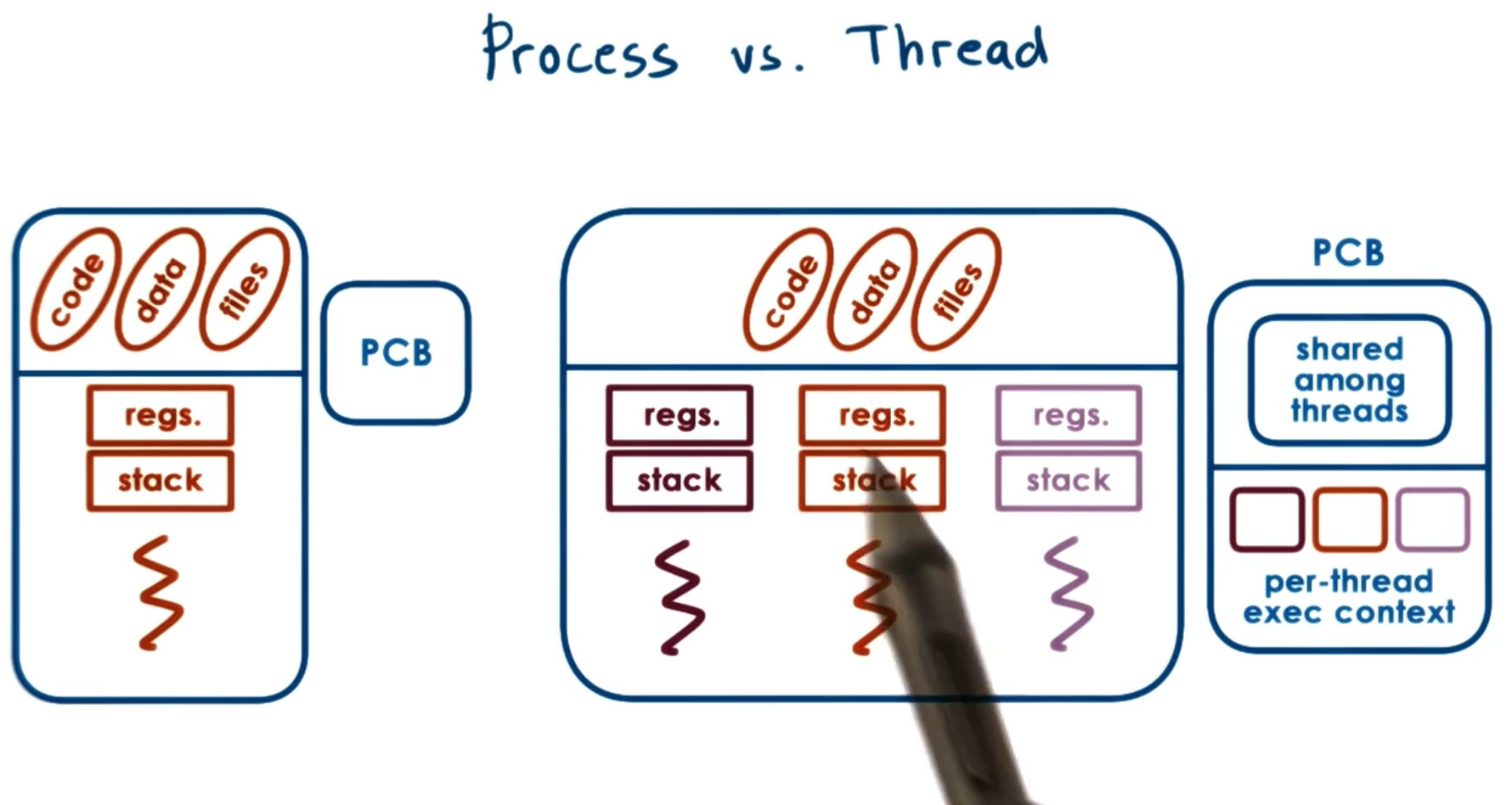
One PCB is created, some of that information is shared among threads, some of it is independent by thread.
Why do we wants threads?
In short, do more with our hardware, faster.
Parallelization - Do the same operation, but with maybe slightly different inputs many times Specialization - One thread does x, other thread does y, enabling many things to be available at once (this keeps the cache hot!)
Why multithreaded instead of multiprocessed? Because Multiprocess requires and entirely new PCB, you don’t get the advantage of the shared address space for some of the overhead things (shown in the image above). So it’s more memory efficient to be multithreaded than multiprocessed. Additionally, it’s easier to communicate between threads than it is between inter-process communication.
Additionally, threads are capable of working more efficiently in ways that multiprocessed operations wouldn’t. Multithreaded context switching takes less time than multiprocessed communication and makes context switching when waiting for things like I/O.
In addition to that, the OS is capable of making itself multithreaded, which then allows many different schedulers to run, and have more processes and threads operating in parallel.
Thread Mechanisms
To make threads work we need things like:
- Thread data structure
- Mechanisms to create and destroy threads
- Mechanisms to safely coordinate among threads running concurrently in the same place
The core issue that we need to handle is the fact that two threads live in the same memory space. The same virtual memory can access the same physical address at the same time. This is bad and indeterminate what will happen. It can create all sorts of bugs.
To handle this threading must employ mutual exclusion meaning that only one thread has access to a given piece of memory at a time. This is handled with mutexes.
Sometimes threads don’t need to be actively doing anything and can be waiting. This is handled with condition variables that the thread watch and wait until they are signalled to come alive and complete processes.
Threads and Thread Creation
These structures are from Burell, and not necessarily directly relate to a real OS.
Thread type (thread data structure) would contain the information needed to define a thread. Things like thread ID, PC, SP, registers, stack, attributes, etc.
The fork call is the thread creation mechanism proposed which has two parameters proc which is the procedure that is performed and args which is the args/input to the passed procedure. This is not the same as unix fork, which is a duplication.
Next we need a mechanism to retrieve and receive the result of it’s child threads. The proposal was the join which means the parent thread is blocked until all threads finish their execution.
These mechanisms are the building blocks by which lots of pretty impressive things can happen.
Mutual Exclusion
Mutex is relatively simple. If you have shared data, you must “acquire” the mutex before you are able to access it or modify it. While this mutex is acquired, any other threads that are attempting to acquire the same mutex, they will simply need to wait until it is released by whatever thread already has it.
This reduces the speed of processing, but makes things safe and impossible to get random garbage from two accesses happening at the same timme.
Condition Variable
When you have many threads, maybe one is the boss and the rest are the workers. Well if the workers are watching some sort of queue, you can get very wasteful very quickly, if the workers are constantly and infinitely checking the status of the queue. So instead we provide a condition variable which is a mechanism for a boss to say something along the lines of “hey get working” to threads which are watching these condition variables.
This waiting and condition variable is used in conjunction with mutex. What this means is that we need to release whatever mutex we might have gotten, and then when the wait is done, it needs to reacquire the mutex.